 Routify
 en
en Русский
Text replacements
Replace X with Y, cut everything after a phrase, strip links, hashtags, mentions and emoji.
Text replacements rewrite the post text before it is delivered. The section exists in the chat settings and in every source, with the Replace / Add to mode switch for sources.
Available from the Pro plan.
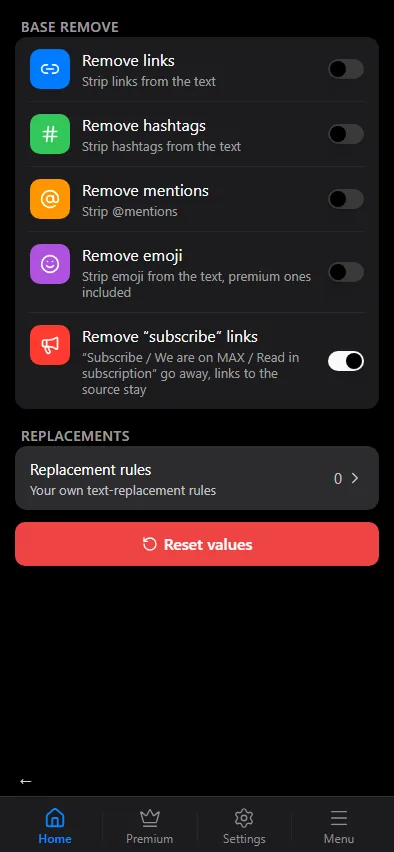
Base replacements
Four switches cover the common cleanups:
- Remove links — strip URLs from the text.
- Remove hashtags — strip
#tags. - Remove mentions — strip
@mentions. - Remove emoji — strip emoji, premium ones included.
Whitespace is tidied after them: runs of spaces collapse into one and more than two empty lines in a row become two.
Replacement rules
Replacement rules opens the list of your own rules. A rule has the text to find, the text to put instead (leave it empty to delete the match) and match options:
- Partial or Word — replace any occurrence anywhere in the text, including inside words, or only whole words.
- Case-insensitive —
BBC,bbcandBbcare treated the same. - Regular expression — the "find" field is a JavaScript pattern; capture groups can be used in the replacement as
$1,$2. The?next to the field opens the same cheat sheet as in Filters. - Remove all after — delete everything from the match to the end of the text. Handy for signatures and "Read more" tails.
All rules are listed at once, with no pages, and a legend at the top shows only the icons your rules use. Tap a rule to edit it; once there are rules, a new one is added with Add Replacement under the list.
Rules run in the order of the list; every rule sees the text as the previous rules left it. The base replacements are applied after your rules.
Examples
| Find | Replace with | Options | Effect |
|---|---|---|---|
Subscribe to our channel | (empty) | Case-insensitive | removes the call to action |
Read the full story | (empty) | Remove all after | cuts the tail of every post |
(\d+) USD | $1 dollars | Regular expression | rewrites currency |
t.me/othersource | t.me/mychannel | Partial | swaps the promoted link |
Where replacements sit in the pipeline
Replacements run on the final text, after filters, translation and AI — see the pipeline order. Filters have an "after replacements" stage that runs on a copy with the replacements already applied, so a stop word can catch text that only appears once a rule has rewritten it.
Checking what was replaced
The history of the chat keeps, for every delivered post, the list of rules that actually fired and how many matches each one replaced. If a post looks wrong, open its row before editing the rules.