 Routify
 en
en Русский
AI filters
Filtering by meaning — ads, off-topic posts: an AI prompt marks the post, and a filter rule at the "After AI" stage drops it.
The keyword filter only catches what is written in the text. To filter by meaning — ads, off-topic posts — the model first marks the post, and a filter rule decides what to do with the mark. There is no separate "AI filter" screen: both steps are ordinary settings.
How to set it up
Open AI processing — in the chat settings to mark posts from all sources, or in a source card for that source only — and turn on a prompt that sets a marker. The ready-made one is Tag promotional posts from the library: if the post is an advertisement, a paid promotion or a sponsored placement, the model appends the line
||ad||at the end, otherwise it returns the post unchanged. For your own topic, write your own prompt the same way: "If the post is not about Formula 1, append||off||at the end, otherwise return it unchanged."Open Message Filtering → Filter rules:
HomeChatMessage FilteringFilter rulesAdd a stop word with this marker —
||ad||or your own. Under When to apply pick After AI: at this stage the marker appended by the model is already in the text.
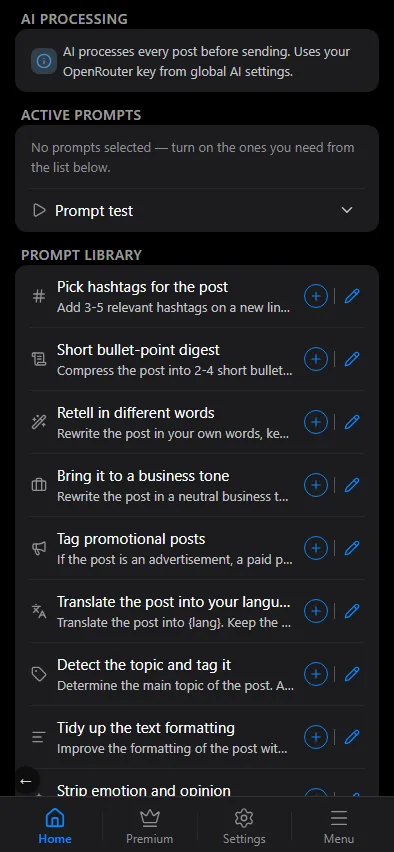

A post with the marker is not delivered and shows up in the events log with the reason. Without the rule the marker simply stays in the post text — handy for checking first that the model marks posts correctly.
You can check the prompt before turning it on with Prompt test on the source's last post. This is more reliable than a stop-word list: the model recognises an ad even without the word "ad" in the text.
Where this sits on a post's path
AI runs after the keyword filters and translation, and before replacements; "After AI" rules run right after the model — see where AI sits in the pipeline. So a post dropped by AI has already spent tokens, and it does not reach the chat for filtered messages.