 Routify
 en
en Русский
Message content
Which media types to copy and how the message is laid out.
Message Content decides which part of a message reaches the destination and a few details of how it looks. It is available on every plan and exists for the chat and for every source.
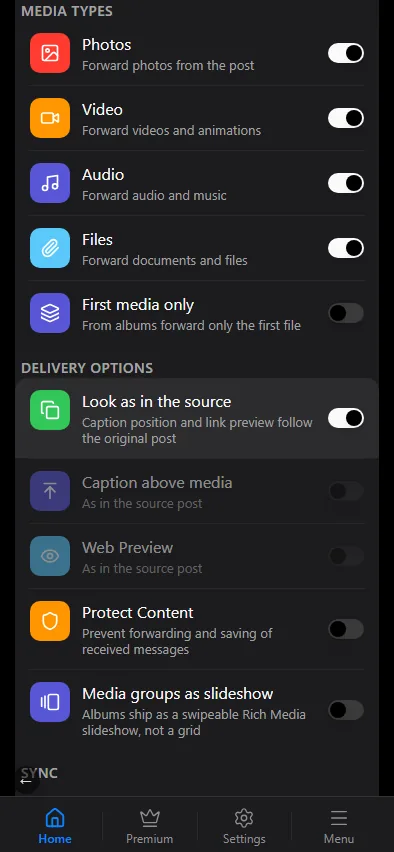
The section works on copies. A native forward (Forward in the source's delivery mode) re-sends the original message as it is.
Media types
- Photos — copy photos from the message.
- Video — copy videos and animations.
- Audio — copy audio files and music.
- Files — copy documents and files.
- First media only — from albums copy only the first file. Useful for channels that want one picture per post.
A message whose only media is switched off is delivered as text; a message with no text and no allowed media is skipped and appears in the log as filtered.
Delivery options
- Look as in the source — the caption position and the link preview follow the original post. While it is on, the next two switches take their value from the post.
- Caption above media — put the text above the photo or video instead of below it.
- Web Preview — show a preview for external links in the text (unless it is the post's own link).
- Protect Content — forbid forwarding and saving of the delivered messages (Telegram's protected content flag). Applies to messages sent by the bot.
- Media groups as slideshow — an album goes out as a swipeable slideshow, Telegram's new Rich Media format.
Sync
The Sync block holds the Sync with the source switch: edits and deletions in the source are repeated in the delivered post. Details are in Syncing edits and deletions.
Related settings elsewhere
- Who sends the message, copy or forward, instant or deferred delivery are in Delivery modes.
- Rules that admit or drop a message by its content — has a photo, has links, is a reply, is forwarded and so on — are in Message filtering.
- A header and a footer, the source's name and the layout of the text are in Message template.
- What happens to the copy after the source message is edited or deleted is in Sync.