 Routify
 en
en Русский
Delivery modes
Copy or forward; by the bot or from your account; instant or deferred delivery; replies and rich posts.
Two things decide how a message reaches the destination: who sends it — the bot or your account — and in what form — a copy or a native Telegram forward. The first is chosen once, when the source is added; the second is changed in the source card.
Who sends
When you add a source, you choose who delivers its messages to the destination:
- Bot — @RoutifyBot sends. The bot must be in the destination with the right to post; in a channel or a group the sending bot can be your own.
- Your account — the connected account sends under its own name. Nothing needs to be added to the destination; the account only has to be allowed to post there.
- Account, bot on flood — the account sends; when Telegram rate-limits it, those posts go through the bot instead of waiting. Requires the bot in the destination like the first option.
A source read by the bot is delivered only by the bot.
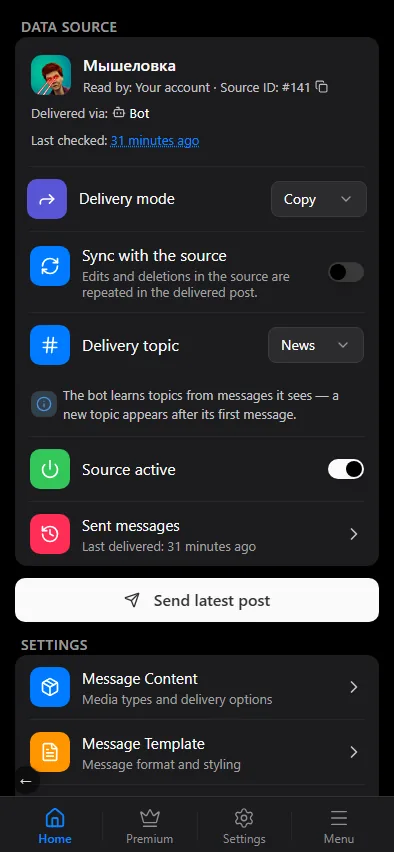
A source card shows two lines above its settings: Read by (for example, Your account) with the Source ID, and Delivered via — Bot or Account. They are for reference, not settings: the delivery path is fixed when the source is added. To deliver differently, add the source again.
Delivery mode
The Delivery mode dropdown in the source card:
- Copy — a new message with the same content. A copy goes through the whole pipeline: the template, filters, replacements, AI, translation and the watermark. When the bot delivers, it uploads the media again, so nothing in the message points to the source.
- Forward — a native Telegram forward: the original message, untouched, with the "Forwarded from" header. Because the original is re-sent as is, the template, replacements, AI, translation and the watermark do not apply; filters do — a message the filters drop is not forwarded. The Copy when forwarding is banned switch: a channel can ban forwarding, and such a post is then sent as a copy instead of being dropped.
The choice matters for the pipeline: everything that changes the text or the media only works on copies.
Chat settings
The chat settings cover other parts of delivery:
- Delivery mode there is about timing: Instant (a post goes out as soon as it appears in the source) or Deferred — see Deferred posting.
- Deliver Messages by Your Bot — send under the name of your own bot.
- Mark as read — mark posts as read for your connected accounts: Source, Destination or Both.
What copies and what does not
A copy carries text, a photo, a video, a GIF, an audio file, a voice message, a video note or a document with its caption. Stickers and polls cannot be re-sent as a copy: such a message is skipped and appears in the log as filtered, unless it has a caption — then only the caption is delivered. Choose Forward for chats where stickers and polls matter.
A text message is limited by Telegram to 4096 characters. Telegram limits a media caption to 1024 characters, so a photo or a video with a longer caption is delivered as one rich message: the media and the full text together, not the media plus a separate reply with the text.
Slideshows and collages (Telegram rich posts) from the source are delivered as rich posts, with photos at full size.
Replies
If a post in the source is a reply to an earlier post that Routify has already delivered, the copy is sent as a reply to that delivered copy. This keeps quote chains intact in the destination.
Forwarding type
New messages delivers what appears in the source from now on. Old messages (history) adds a Copy history button to the source card that walks through the past messages of the chat, see Managing sources. The type does not change what happens to new messages: they are delivered either way.