 Routify
 en
en Русский
Filters
Content filters, keyword rules with regular expressions, the similarity filter and a channel for what was filtered.
Message filtering decides which posts of a source are not delivered. The section exists in the chat settings and in every source; a source either replaces the chat's filters or adds to them — the Mode switch at the top of the source section, Replace or Add to. In Add to mode a chat-level rule cannot be switched off for one source.
Filters are available from the Pro plan. The similarity filter, the chat for filtered messages and filtering by reactions and views — from the Expert plan.
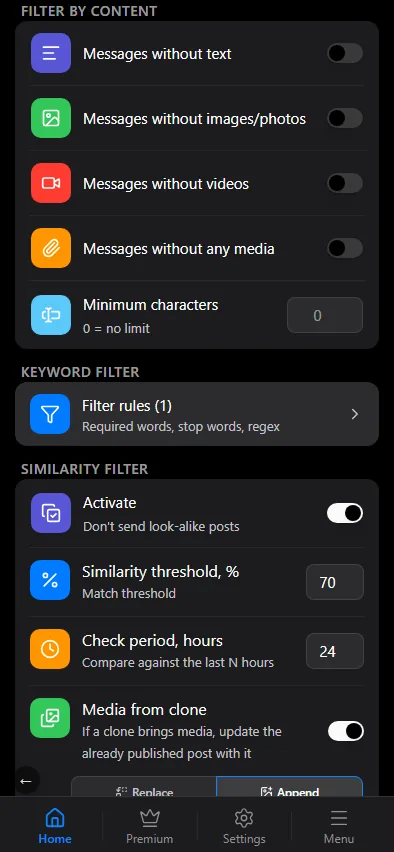
Filter by content
Quick switches that drop whole classes of posts:
- messages without text;
- messages without images;
- messages without videos;
- messages without any media;
- messages shorter than a minimum number of characters (0 = no limit).
Keyword rules
Filter rules opens the rule editor. Two kinds of rule:
- Required words — the post is delivered only if it contains at least one of them. Use them to follow one topic in a busy chat.
- Stop words — a post containing any of them is never delivered.
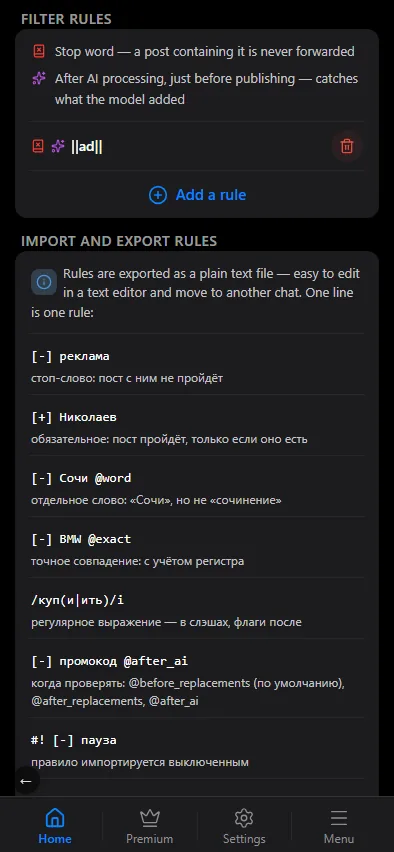
All rules are listed at once, with no pages, and a legend at the top shows only the icons your rules use. Tap a rule to edit it. Once there are rules, the add form is tucked behind Add a rule under the list.
Each rule has options:
- Exact match — case-sensitive.
- Separate word — matches a whole word, so
artdoes not matchstart. - Regular expression — the pattern is a JavaScript regular expression, for example
\b(BTC|ETH)\borprice[:\s]+\d+. - When to apply — on the original text right after reception, on the replaced text after replacements, or after AI processing. Choose the stage the words are guaranteed to be in: a stop word is cheapest on the original text, while a marker that an AI prompt appends is only there after AI.
A post must pass every stop rule and at least one required rule (if any required rules exist).
Regular expression cheat sheet
The ? next to a pattern field opens the same legend in the mini app:
| Pattern | Meaning |
|---|---|
. | any character |
* | 0 or more repetitions |
+ | 1 or more repetitions |
? | 0 or 1 |
\d | a digit 0–9 |
\w | a letter, a digit or _ |
\s | whitespace |
\b | word boundary |
^ / $ | start / end of the line |
[abc] | one of the characters |
(a|b) | a or b |
\d{3,5} | a number of 3–5 digits |
Similarity filter
Chats often repeat each other: three news channels post the same story, one channel posts the same picture twice. The similarity filter compares every new post with the ones delivered to the chat over the last hours and drops look-alikes.
- Similarity threshold, % — how close two posts must be to count as the same, from 1 to 99 percent. The switch turns on at 80 by default.
- Check period, hours — how many hours back to compare, from 1 to 72.
The filter is shared by the whole chat and looks across all its sources: it is set up only in the chat's filters, a source's settings do not have it. Expert and above.
The same video also helps to spot a repeat: when two posts carry the same video — the same length (±1 second) and the same proportions — the text similarity threshold for them is lowered.
Clones: updating the original
A clone is a later post that is similar to one already delivered. Usually it is simply not delivered, but sometimes the clone has more: a video the original lacked, or the full text instead of a short teaser. Then the already published original can be updated from the clone:
- Media from clone — if a clone brings media, update the published post with it: Append adds the clone's media to what is there, Replace replaces the original's media. Only if the original has no media — leave a post that already has media alone.
- Text from clone — replace the published post's text if the clone has noticeably more text. Longer by, % — how much longer the clone's text must be than the original's.
The original is published again with the merged content. Media the original already has is not added twice: the same file, the same video uploaded again (the same proportions, length within ~10% — a trimmed copy, for example) or the same photo compressed again. If the original has a GIF and the clone has the same clip as a regular video, the video with sound replaces the GIF.
Chat for filtered messages
Nothing is lost silently. Set a private channel or group in Chat for filtered messages — a topic of a forum group works too, paste the topic link — and every filtered post and every clone is published there with a label saying why:
- "🚫 Filtered: reason" — a filter caught the post;
- "🚫 Filtered by AI" — an AI filter dropped the post;
- "♻️ Clone · match N% (threshold M%) — already published" — the link leads to the published original.
If the original was updated from the clone, a second line follows — "✏️ Original updated — media: added …; text replaced …" — and, if the text was replaced, the old text as a collapsed "Was:" quote.
Add @RoutifyBot as an administrator of the chat and paste its id, @username or the topic link. If Mark as read is on for the recipient (Destination or Both), messages sent to this chat, albums included, are marked as read too. Expert and above: filtered posts arrive with media that has to be fully downloaded and re-uploaded.
AI filters
Filtering by meaning ("drop advertising", "keep only posts about Formula 1") is done with filter prompts in AI processing. They run after the keyword rules.
Time filter
The window of hours and days when delivery is allowed is described on its own page: Delivery window.
Why was a post filtered?
Every filtered post stays in the chat's history with the rule that caught it — open the row to see the whole pipeline trace, step by step.