 Routify
 en
en Русский
AI processing
Summaries, rewrites, translation, a new headline, your own prompts, AI filters and your own OpenRouter key.
AI processing rewrites or filters a post with a language model before it reaches the chat. It is configured per source.
Available from the Expert plan. With your own OpenRouter key and model, requests go through your key.
Prompts
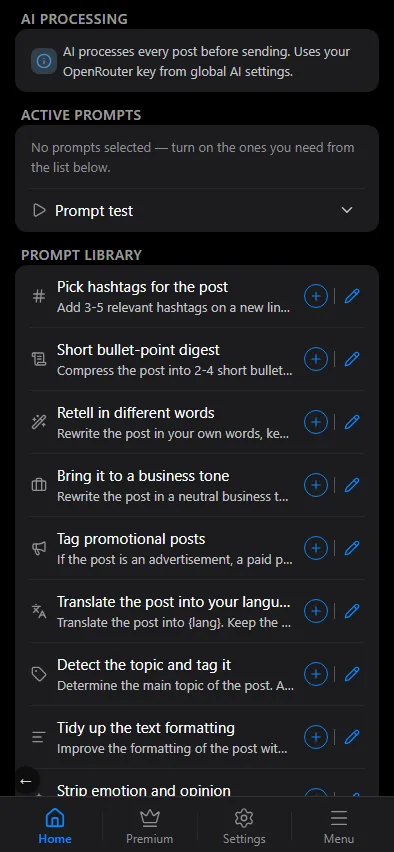
Open the source settings → AI processing. The screen has two lists:
- Active prompts — what runs on every post of this source, top to bottom. Drag by the handle to reorder, or tap a row to edit it.
- Prompt library — ready-made prompts and the ones you wrote, shown in your interface language. Tap a prompt to move it to the active list; the pencil edits a prompt (editing a ready-made one saves your own copy), the bin deletes your own. In the active list the bin turns a prompt off again.
Ready-made prompts include: Translate, Detect the topic and tag it, Pick hashtags, Short bullet-point digest, Retell in different words, Bring it to a business tone, Tag promotional posts, Tidy up the text formatting, Strip emotion and opinion, Break a trading signal into fields, Mark how urgent a trading signal is, Let through client requests only. Your own prompt is free text: describe what to do with the post, in any language.
Three kinds of prompt exist:
- Transform — changes the text: summary, rewrite, translation, style, hashtags. A prompt you write is always a transform prompt.
- Filter — answers a yes/no question about the post and drops it on "yes".
- Keep only — the same yes/no question, but only matching posts are delivered. The library ships one such prompt, Let through client requests only; filtering by meaning is done with it.
All active transform prompts are combined into one request per post; filter prompts run separately. The model works on the text only — it does not see the media. Prompt test takes any pasted text or the source's last delivered post, runs it through your prompts, translation and filters with your model, and reports the tokens spent and whether the post would be dropped.
LLM settings
LLM settings decide which model does the work. They are yours, not the chat's: one key and one list of models for every chat and source you own.
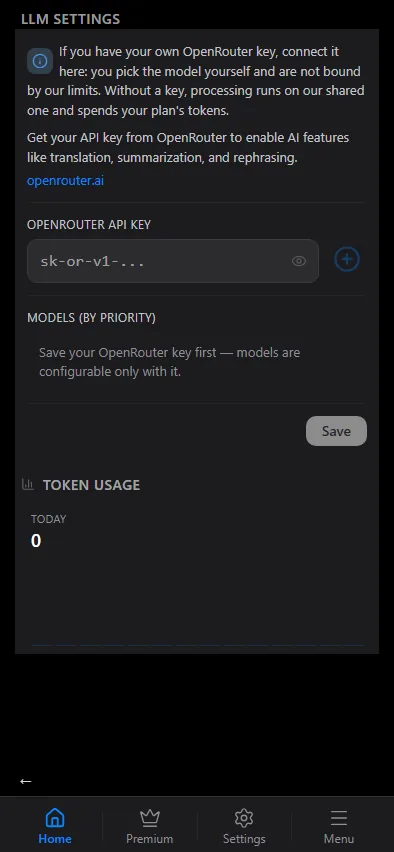
- Without a key the bot uses its shared OpenRouter account and a model chosen by us; the tokens are charged against your plan's daily budget.
- With your own OpenRouter key you pick the models yourself — the first one is primary, the next ones are fallbacks if it is unavailable — and pay OpenRouter directly; the plan budget is not touched. Get a key at openrouter.ai; the list in the mini app shows the available models with their price per million tokens.
A key without a model is ignored: processing keeps running through the shared pool until you pick at least one model. Your chosen model only takes effect together with your own key.
Token usage at the bottom shows the recent days by day and by model.
Where AI sits in the pipeline
Reception → keyword filters → translation (if on) → AI filter prompts → AI transform prompts → text replacements, applied to the final text → template → delivery.
Translation always runs first, then the active prompts work on the translated text. If a model call fails, the step is skipped and the post goes out as it was before that step — an AI error never drops a post by itself.
Tips
- Keep the prompt about the text only; the model does not see the media.
- Ask for the answer "in the language of the post" if the source mixes languages.
- Ad detection: the ready-made Tag promotional posts prompt appends a marker to the text, and a keyword rule with the After AI stage decides what to do with it — drop the post, send it to the chat for filtered messages, or just keep the mark. That is more reliable than a stop-word list.
- Every AI step is recorded in the chat's history: which prompt ran, whether it changed the text, and how long it took. Check it before blaming the prompt.