
 en
 Русский
Plans and payment
What each plan includes, the trial, payment methods, cancelling and refunds.
The current prices and the full comparison are on the pricing page; the numbers there come from the same API the bot uses and are adjusted to your region. This page explains how the plans are structured.
Routify has no free plan: forwards and delivery work only on a paid plan or during the trial, see Without a plan.
Pro
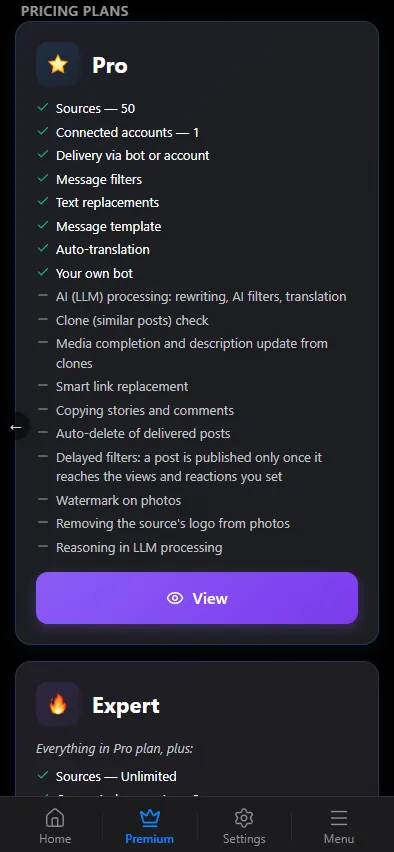
Up to 50 sources, one connected account and the base processing pipeline: filters, text replacements, your own message template, translation via Google, the chat for filtered messages, deferred posting and delivery from your own account. No AI processing of posts.
Expert
Everything in Pro with no limit on the number of sources and up to 3 connected accounts, plus AI processing of every post — rewriting, AI filters and translation — the similarity filter with media and text updates of the original, auto-delete of delivered posts, smart routing by topic, and delivery of a source's stories (the Send stories switch in the source card). Pick Expert for AI processing, clone detection, or a network that outgrows 50 sources and one account.
Ultra
Everything in Expert and up to 5 connected accounts, plus watermarks on incoming photos, logo removal from a source's photos, delayed filters that publish only posts that collect views and reactions, and reasoning models in AI processing.
Business
Everything in Ultra with no limit on connected accounts, plus work done around your task: custom filters and handlers, custom AI processing and logic, message flow management, extra integrations and features added on request, and a personal support manager. Business is arranged through support; the pricing page shows the starting price.
Trial
The first week of Ultra is free, needs no card and starts by itself: when you add your first source — in the mini app, in the chat with the bot or by import — Routify turns on Ultra for 7 days. There is no "try" button. The bot sends a message with the end date, and the mini app header shows a Free period until … line. The trial is given once per Telegram account; after a long break (currently about half a year) it can start again.
The trial has Ultra's features and limits, including 5 connected accounts. It differs from paid Ultra in two ways:
- Media traffic is capped (currently 50 GB). Once the cap is used up, the bot says so in a single message, and until the trial ends videos are not forwarded; text and photos go through as usual.
- Copying old messages takes at most the 100 latest posts per run, see Copying old messages.
Without a plan
Without a plan Routify forwards nothing. If you have not had the trial yet, that does not stop you from starting: your very first forward turns on the free week, see above.
When the trial or the subscription has ended and there is no new plan:
- forward rules are turned off, and the bot sends a Forwarding stopped message with their number;
- opening the mini app right away shows the Your trial has ended window with a Buy Premium button; destinations, accounts and the home screen buttons turn grey and do not respond until you get a plan;
- no new forward is created in the chat with the bot: it replies that adding sources requires a subscription.
Settings, forwards and connected accounts are kept meanwhile. Once you pay, turn the rules that were switched off back on in the mini app — with the source's switch, or all at once in the list of sources.
Paying
Payment happens in the mini app, Premium tab. Choose a plan, a period (a month, three months or a year — a year saves 20%; each term has a short description) and a method:
- bank cards via Stripe, including Apple Pay and Google Pay where your device supports them;
- Telegram Stars;
- cryptocurrency (USDT, ETH, BTC, LTC, SOL, TRX, GRAM).
The set of methods depends on your region and is shown at checkout.
Prices are in US dollars and adjusted to your region automatically. Receipts arrive by email when the method provides one.
Renewal and cancellation
The plan is active until the end of the paid period; the Settings tab shows the date. Renew from the same tab. Cancel any time: the plan stays active until the paid period ends and no further charges follow.
Auto-renewal can be switched off and back on: when it is off, the plan runs to the end of the paid period and then simply ends.
The first purchase of a plan can be refunded within 14 days if the service has not been substantially used; renewals are not refundable. Payments made with Telegram Stars are refunded in Stars, under Telegram's own rules. The details are in the refund policy.
Transferring a subscription to a chat owner
A chat's limits come from its owner's plan. If you paid for a plan but the owner of a chat whose admin team you belong to needs it, you can transfer the subscription to them.
The Transfer subscription button sits with the current plan on the Premium tab and on the Settings tab. It shows when the plan is paid, it is not a trial, auto-renewal is off and the subscription was not transferred to you by someone else. In the Transfer subscription window pick the owner and tap Send offer: the owner gets it in the bot with Accept and Decline buttons. The offer lasts 7 days; while it waits for a reply you can withdraw it with Withdraw offer.
If the owner has no plan, the subscription moves to them whole and is switched off for you. If they have the same plan with no trial and no auto-renewal, your remaining days are added to their subscription. If the owner has a different plan, a trial or auto-renewal on, the transfer can't happen automatically: contact support and it will be done by hand. Everything is checked again at the moment the owner taps Accept.
What a downgrade does
You can switch to a lower plan only after the paid period ends — until then your current plan stays active.
When the plan changes to a cheaper one, nothing is deleted: sources stay in the list with all their settings, but you cannot add new ones beyond the new plan's limit. Settings of sections the new plan lacks are kept as well — they simply stop applying until the plan covers them again: on Pro, for example, AI processing, the similarity filter and auto-delete do not work; on Expert, the watermark, logo removal and delayed filters.