 Routify
 en
en Русский
Custom emoji
Premium emoji in headers, footers and templates, and in the forwarded posts themselves.
Telegram Premium emoji (custom emoji) are animated icons from sticker packs that can be used inside text. Routify supports them in two places.
Available from the Pro plan.
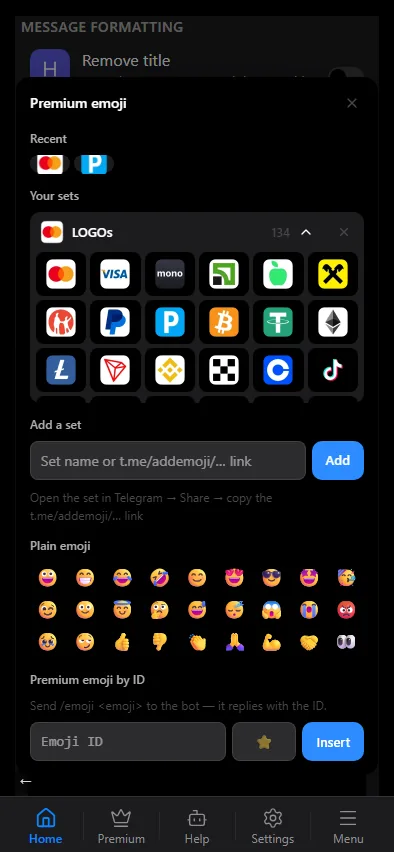
In templates, headers and footers
Any custom emoji can go into a message template through the ☺ button on the toolbar of the mini app's template editor: it opens a small form with two fields — the emoji character and its id — and inserts the <tg-emoji> code. The same form fills the premium-emoji field of an inline button, and a double-click on an inserted emoji reopens it for editing. A copied  token pasted into the editor also becomes a live emoji. In the visual editor a premium emoji is shown as its picture, like in Telegram; the HTML source mode shows the code behind it.
Written by hand, a premium emoji looks like this:
<tg-emoji emoji-id="5368324170671202286">🔥</tg-emoji>The character inside the tag is the fallback: it is what readers see in a client that cannot show the premium one.
In forwarded posts
Sources are read through your connected account, so a post arrives with its custom emoji intact, and the bot carries them into the destination itself — no Telegram Premium on your account is needed. The limits of Telegram are unchanged: 1024 characters for a media caption, 4096 for a text-only post.
Remove emoji in text replacements strips premium emoji too — the whole tag, not just the character inside it.
Where to get an emoji id
Any Telegram client that shows sticker packs can copy a premium emoji; pasting it into the editor is the simplest way. The id is also visible in the HTML source mode after inserting the emoji once.