 Routify
 en
en Русский
History
The delivery log of a chat with statuses, the per-post pipeline trace, and how edits and deletions are kept in sync.
History in the chat settings is the delivery log: every post the bot received from the chat's sources, what happened to it and why. It is the first place to look when "nothing arrives" or "the post looks wrong".
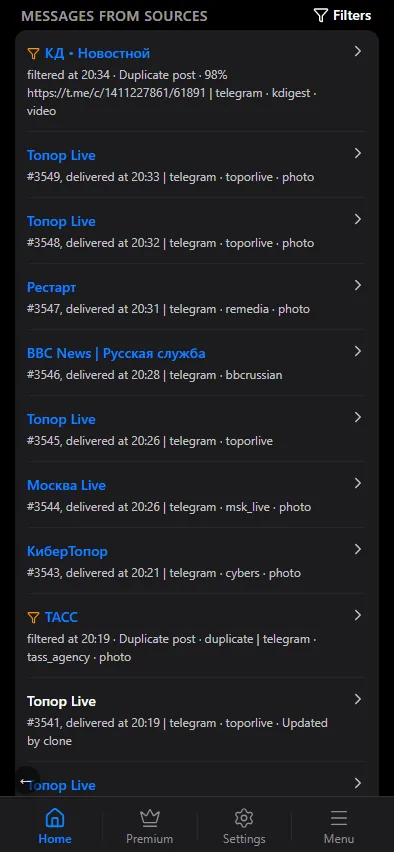
The list
One row per post: the source, the time, a short preview and the status:
- Delivered — sent to the chat; Open in channel → jumps to the message.
- Filtered — dropped by a filter; the row names the rule that matched.
- Failed — Telegram or the source refused; the row keeps the error details.
- Awaiting publication — parked by deferred posting or the delivery window, not yet sent.
- Skipped / Partial — the post was not sent for another reason, or only part of an album went through; the row explains.
Filter the list by status, by date range, by source and by source type. The number of active filters is shown on the filter button; Reset filters clears them.
One post in detail
Tap a row to expand it. The row shows the final text as it was sent, the buttons, the attachments, and two snapshots — the source settings and the chat settings at the moment of delivery. Snapshots are what make old rows readable: if you change a template today, yesterday's rows still show which template produced them.
Below that sits the pipeline trace — what was applied to the post, one block per step:
- Recipient filters, Filters after replacements, Filters after AI — passed, or dropped by which rule.
- Duplicate check — a duplicate found, or none.
- Replacements — how many rules fired, and for each one what was replaced with what and how many times.
- AI filter, AI: custom prompt, AI: title, AI: description — whether the model changed the text, or the error it returned.
- Translation — the language the post was translated to.
- Sent to moderation — the card went to the moderation chat.
Every step shows how long it took. On a phone the steps stack vertically; on a wide screen they run left to right with arrows between them. The trace is recorded for filtered posts as well, so "why was it dropped" is answered by the same block as "how was it delivered".
Events log
Events Log in the Management section of the chat settings is a feed of what happened to posts: what was not delivered (filtered out, filtered out by AI, a clone that was already published) and how clones updated posts already published (media added or replaced, description added or replaced, see Filters).
Tap an event to open its card: a media preview, the text, the reason, the processing trace step by step, and links to the post in the source and to the published copy.
Edits and deletions
When a source edits or deletes a message, Routify can repeat the change in the chat — see Syncing edits and deletions. To do that it remembers which delivered message corresponds to which source message. The memory is kept for 72 hours after delivery — longer than Telegram's own 48-hour window for editing a message — and survives restarts of the service. Older edits and deletions are not propagated.
Copying the past
A source normally starts from the moment it is added. Copy history in the source settings walks through its earlier posts — 200 by default, up to 1000 — and runs them through the same pipeline: filters, replacements, AI, template. The copied posts appear in the history like any other, and the run is throttled so Telegram does not rate-limit the account. Whether this is available on your plan is shown on the pricing page.
Retention
History is stored on our servers together with the chat's settings. Unlink chat in the chat settings deletes the chat with its sources, settings and history; see Security for what else is stored and how to remove it.